Summary:
- Soundraw is an AI music generator that creates short, royalty-free music tracks using Artificial Intelligence.
- The app generates a list of music tracks that can be played by tapping on the icons.
- You can filter the tracks by genre, mood, and theme.
- Soundraw can create music in genres such as Hip Hop, Trap, R&B, Acoustic, Rock, Funk, House, Techno & Trance, and more.
- You can customize the length and tempo of the music.
- The app allows you to switch between different instruments and music keys.
- In “Pro” mode, you can toggle instruments on and off, set the intensity of each instrument, add fills to the beginning or ending of segments, and extend the music by adding additional blocks.
- Soundraw offers the option to download tracks or share them with others.
- The quality of the tracks is excellent, but they may sound similar due to the nature of AI-generated music.
- With a free account, users can generate unlimited songs but cannot download them.
- Soundraw offers monthly and yearly subscription plans.
What is Soundraw?
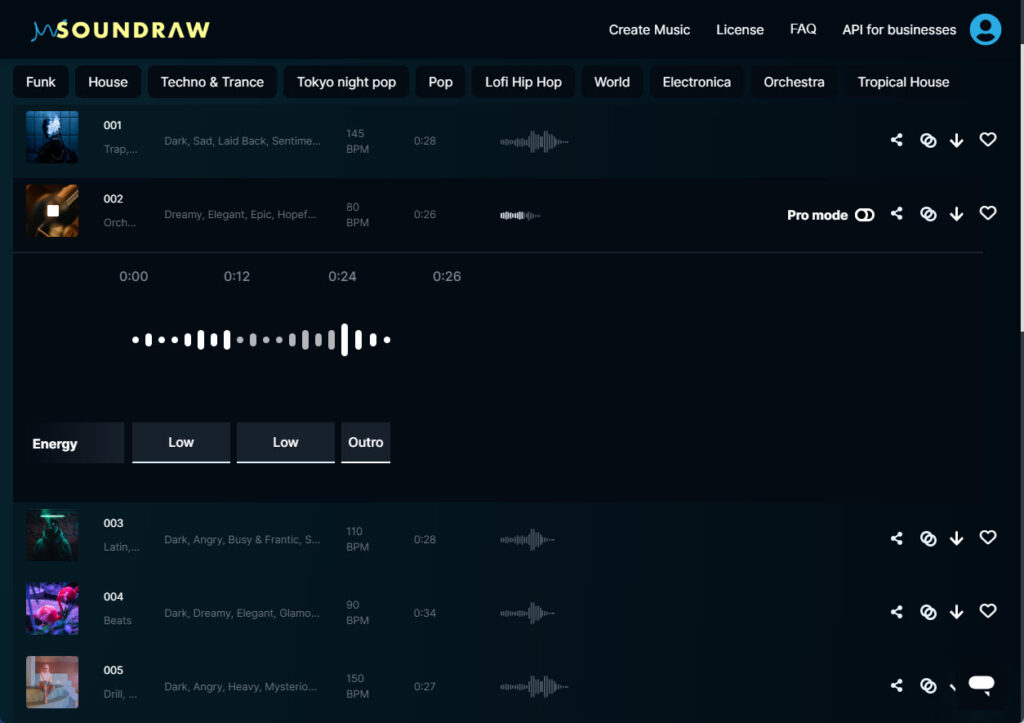
Soundraw is an AI music generator that automatically creates an infinite amount of short, royalty free music tracks (up to 5 minutes long) in various genres using Artificial Intelligence.
How does Soundraw work? – Making Music With Soundraw
The app generates many short pieces of music in a playable list (tap the icons to play)
Once you find something you like, you can choose to download it or customise it using their simple in-app tools. You can also take it a little further if you’d like, by tapping the ‘pro’ mode button which then opens up additional customization options for an even more custom tailored tune.
How to use Soundraw
To start with, you are almost immediately presented with a freshly generated batch of songs in various genres.
These are custom created for you each time. Brand new, unique AI generated compositions in various genres.
You can filter them by Genre, Mood and/or Theme

Each song has a short description, including suggested uses like “background music” or “Movie trailer”.
To audition any of them, you just hit the play button on the icon at the left. Hit it again to stop.
Genre and Instruments
Soundraw can currently create music in these genres:
Hip Hop, Trap, Drill, R&B, Jersey Club, Latin, Acoustic, Rock, Ambient, Beats, Drum n Bass, Electro & Dance, Funk, House, Techno & Trance, Tokyo Night Pop, Pop, Lofi Hip Hop, World, Electronica, Orchestra, and Tropical House.
You can also filter by mood and Soundraw has many, including Epic, Dreamy, Scary and Euphoric.
Not all musical moods are available for all genres.
Downloading Soundraw music
To download a track, just hit the download button (down arrow)
You can also choose to share the song with a unique link.
If the person you share it with does not have an account, they will be prompted to create one before downloading it, but anyone can play it without registering.
This is useful if you are working with a client and want them to audition and approve the tracks before you include them in your project.
Customizing Soundraw Music Output
This may be the apps biggest distinguishing features. Unlike most AI generators, Soundraw generates the music in short, seamless blocks, with separate tracks for each instrument. This means you can customise the tune quite a bit, albeit within fairly narrow parameters.
Customising the Length and Tempo of the music
You can choose to create songs of any length from 10 seconds to 5 minutes from the dropdown at the top, or customise the length in Pro mode by adding or deleting 12 second segments.
The maximum is currently 5 minutes no matter what even in Pro mode.
As for tempo, you can choose between slow, normal and fast in the tempo drop-down next to the length selector.
Changing Instruments
You can switch between about a dozen different instruments, some of which change the sound quite a bit. Here’s an example of one tune with 5 different instrument configurations:
Changing Music Key
You can switch between 4 keys. What they are is not clear but this is how you do it, and example of how they sound.
Editing Music in Pro Mode
When you toggle on Pro mode, the track opens up allowing you to:
- Toggle instruments on or off for each segment.
- Set the intensity of each instrument on each track to low, medium or high.
- Add fills to the in or out point of every block.
- Extend the music by adding additional blocks (up to 5 minutes)
Changing Music Intensity
Tapping on each instrument block toggles the intensity from off, to low, to medium or high. You can do this with each of the five instruments, for each segment.
To understand what that sounds like, I’ve edited a track in Pro mode by adding one instrument per block, then increasing the intensity of each instrument and then diminishing them again, one by one.
Drum Fills and Transitions
In Pro mode, you can choose between intro and outro fills for each section. It adds a little percussive flourish as a transition to the beginning or ending of a segment. There are 3 options for each in and out.
You can hear Fills in the video above beginning at the 1:20 mark. You can see them represented as white and blue triangles below the instrument blocks. The gray triangles represent no fill.
Here is what it sounds like if you change the fill settings:
Is Soundraw AI music any good?
Technically, the quality of the tracks is excellent, and Soundraw is a leader in the field of AI generated music and is probably the best one of all the ai music generators that I have tried.
The music sounds clear, professionally mixed and well mastered.
Creatively however, after you have listened to 30 or so Soundraw tracks, you will notice, that like all AI creations, they tend to sound fairly similar.
This is more of a function of how AI software tools work. In order to create music that sounds genuine, like ‘real’ music, AI will make things that blend in with everything else. Creativity is not in AI’s nature. Blending in is, so don’t expect anything unique.
Expect the expected!
Examples of Soundraw AI Music
What Can you Do With Soundraw For Free?
With a free Soundraw account, you can generate unlimited songs for free, but no downloading! Which is really only useful for trying it out.
Speaking of free, I have no vested interest here, I was not paid or compensated in any way for this Soundraw review and I will not be compensated in any way if you sign up, I am just a Soundraw user myself.
Soundraw Pricing
Soundraw Discounts and LifeTime Deal
Soundraw was available as a pay once, Lifetime deal on Appsumo in 2021 (you can still read the reviews of it here) but that deal is long over and it’s currently only available as a monthly subscription from Soundraw.
The only discount available is to pay for a yearly subscription vs monthly.
If you are looking for music for a project, your best option might be to buy a one month subscription, create all your music and then cancel.
You get to keep all the music you downloaded while you were a member (at 50 downloads per day, that comes out to 1500 tracks per month!*)
* That’s on the Creator plan. The Artist plan is limited to 30 downloads per month, but you can sell them as is vs distribute them as a part of a video, post, ad, etc on the Creator plan.
Music License and Usage Rights
You can read the actual license on the website, but the basic idea is this:
With a Creator account you can download and use the music in anything you create
(Ideal for social media content creators)
For example:
- YouTube video
- Video or audio ad
- Video tutorial
- Podcast
With an Artist account you can use the downloaded music to create and sell up to 30 tracks per month. These can be published anywhere you like, including:
- Spotify
- Apple Music
- YouTube
- Google Play Music
Soundraw Alternatives
Soundraw FAQ Bot
Being an AI tool, it makes sense that Soundraw would have an AI chatbot.
Great idea, but the answers it gives seem almost exclusively related to paid vs free accounts. It seems to be a very sales oriented bot. I couldn’t get it to answer a specific question I had, as it seemed to be obsessed with telling me about subscriptions.
So I built my own Soundraw AI bot. Try it out yourself below if you have any questions.
Enter a question about Soundraw above and the AI bot will try to answer.


